TL;DR
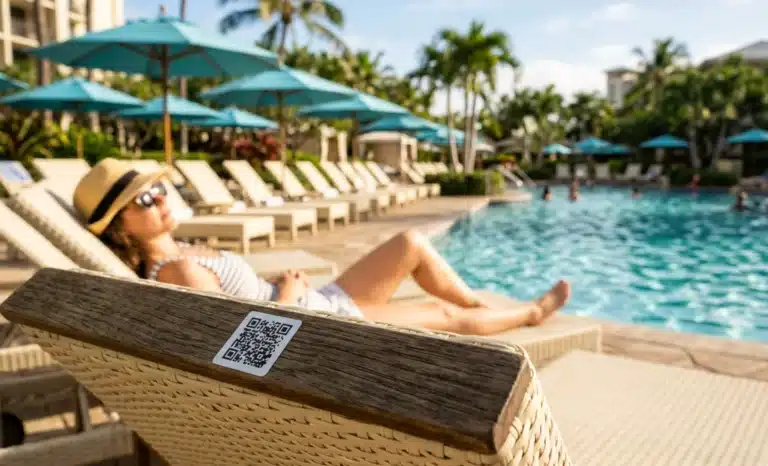
- A QR code for a swimming pool placed on each lounger or umbrella lets guests order food, drinks, and amenities from where they are lying, without flagging down staff.
- Dynamic QR codes are the right fit because pool menus change constantly with seasons, daily specials, and stock, and the code never needs reprinting.
- A conversational AI layer like Cleo answers questions about ingredients, allergens, and recommendations instantly, in the guest’s own language.
- The result is faster service at peak hours, higher average tickets, and staff freed to deliver rather than take orders.
The pool deck is one of the most underserved revenue areas in hospitality. Guests are spread across dozens of loungers, staff is limited, and peak hours move fast. Most guests who want a drink simply do not order, because getting up, finding a server, or waving across the water is more effort than it is worth. A QR code for a swimming pool removes that friction. When the code sits on the lounger itself, every seat becomes an ordering station, and demand that used to evaporate gets captured.
This guide walks pool operators and managers of swimming facilities through how poolside QR ordering works, why a dynamic QR code is the right choice for a swimming pool, where a conversational AI layer fits, and how to deploy the system without the mistakes that quietly kill adoption.
Why is pool service so hard to get right?
Pool service breaks down because of geometry and timing. Guests lie far apart across a large open area, often with their eyes closed or in the water, while a small team tries to cover everyone during a two or three hour peak. Servers get missed, orders get delayed, and revenue quietly leaks away through guests who decided ordering was not worth the trouble.
The problem is structural, not a staffing failure. You can add more servers to the swimming pool deck and still lose orders, because the bottleneck is the act of getting a guest’s attention and walking back and forth across a busy area.
Cutting out the order-taking trip is what actually changes the math. A QR code on each lounger lets the guest start the order the moment they feel like a drink, which is the gap a scannable menu is built to close.
How does poolside QR ordering work in practice?
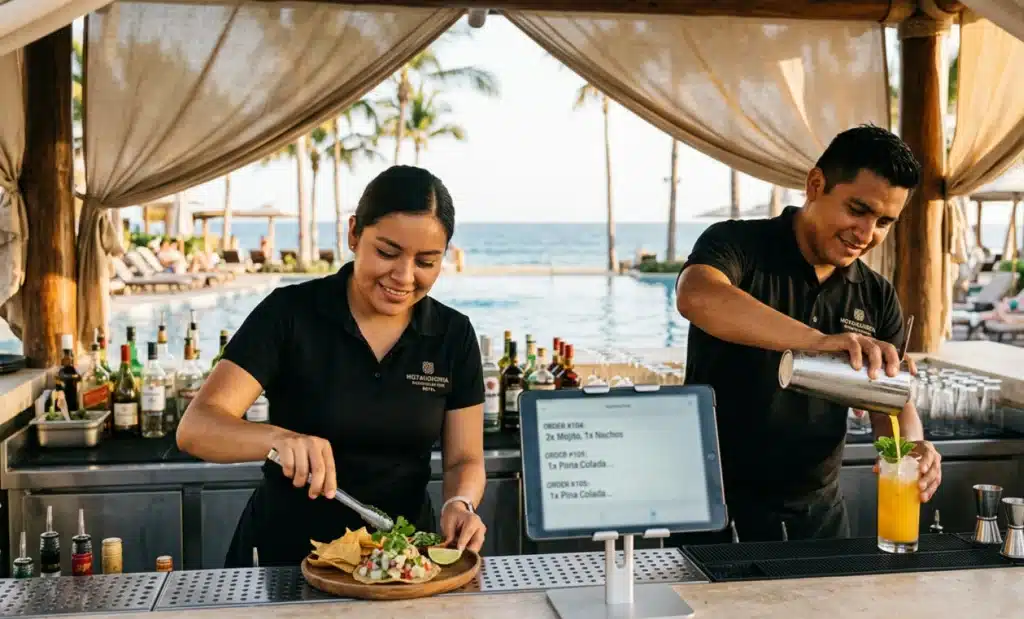
A waterproof sticker or laminated card on each lounger, umbrella, or side table holds a QR code. The guest scans it, a mobile menu opens in the browser, they browse and order, and the kitchen or bar receives the order tagged with the lounger number. Staff then deliver straight to the seat without ever having taken the order by hand.
There is no app to download and no account to set up before the first drink. The whole flow happens in the phone’s browser, which keeps the barrier to a single scan.
What does the guest experience look like step by step?
The guest points their smartphone camera at the QR code, taps the link, and lands on a mobile menu within a couple of seconds. They browse drinks and food, add what they want, note any preferences, and confirm. The order reaches staff in real time, and a short confirmation tells the guest it is on its way to their lounger. No queueing, no waving, no getting up.
That simplicity is the whole point at a swimming pool, where every extra tap or login is a reason to give up and lie back down instead of finishing the order.
How does the order reach the bar or kitchen?
The order arrives at the bar or kitchen as typed text, tagged with the lounger number the guest scanned from. Staff see exactly what was ordered and where it needs to go, so delivery is precise even when the deck is full and noisy. Because the request is written, there is no mishearing a cocktail name over splashing and music, which removes a surprising amount of friction from a high-volume shift.
Why are dynamic QR codes the right choice for a swimming pool?
Dynamic QR codes are the right choice because a pool menu is never static. Seasonal cocktails come and go, daily specials change, items run out by mid-afternoon, and weather shifts what makes sense to serve. A dynamic QR code lets you update the menu behind it instantly, so the printed sticker on the lounger stays the same while the content stays current.
This matters most on the days when it matters most. A heat wave, a sold-out signature cocktail, or a new frozen drink for the weekend is a quick edit rather than a print run. The physical QR code on the umbrella never moves, but the menu behind it is always live.

What is the difference between a dynamic and a static QR code?
A static QR code locks the destination at the moment it is printed, so any menu change means reprinting and replacing every sticker across hundreds of loungers. A dynamic QR code separates the printed code from the content, so the destination can be edited at any time without touching the physical code.
For a swimming pool with a menu that shifts daily, that difference decides whether updates take seconds or take a print run. QRCodeKIT, which has built dynamic QR code technology since 2009, lets the destination and the menu behind the code be managed like a web page. You print once and edit as often as the pool needs.
Where does conversational AI like Cleo fit at the pool?
Cleo, the conversational AI layer from QRCodeKIT, fits the moments a busy bartender cannot. International guests often have questions before they order: what is in a drink, whether something is dairy free, what pairs well with the afternoon. At peak hours a bartender cannot stop mixing to answer each one, and Cleo handles those conversations instantly.
The point is not to replace the human touch. It is to absorb the repetitive informational questions that would otherwise pull a bartender off the line during the exact window when speed matters most.
How does Cleo handle ingredient and allergen questions?
Cleo draws on the menu information the venue configures, so it can answer questions about ingredients, allergens, and recommendations directly inside the conversation. A guest can ask whether a cocktail contains egg white or which dishes are gluten free and get a clear answer without waiting for a server to check.
Cleo is multilingual by design, so a guest can ask about allergens in German or request a recommendation in Spanish and get a clear answer in their own language. At an international swimming pool that keeps the bar focused on making drinks while every guest still gets a real answer to a real question.
What can guests do beyond ordering food and drinks?
The same scannable code can carry far more than a drinks menu once guests are already in the habit of using it. A single QR code for a swimming pool can become the front door to most of the resort’s poolside services.
- Towel and amenity requests sent straight to housekeeping or the pool team.
- Sunscreen, water, and small item delivery to the lounger.
- Spa, fitness, and activity booking, so guests can reserve activities without leaving the deck.
- Local information and resort guides for guests planning the rest of their day.
- Feedback collected during the experience, while it is happening, instead of in a survey days later.
Capturing feedback in the moment is especially valuable. A guest who flags a slow drink while still at the pool gives you a chance to fix it on the spot, which is worth far more than a low review posted after checkout.
Which venues get the most from a QR code for a swimming pool?
The venues that gain the most are the ones with a large deck, a small service team, and intense peak hours. Resort and hotel pools, beach clubs, and dedicated pool bars all share the same structural problem, and a QR code for a swimming pool solves it in the same way at each.
A resort pool with hundreds of loungers spread over a wide area is the clearest case, since walking staff simply cannot cover that footprint at midday. A beach club layers in high turnover and a party atmosphere where shouting an order rarely works. A pool bar with a fixed counter benefits too, because customers can order from their seat instead of leaving it and losing their spot.
The same logic extends beyond holiday venues. Member clubs, residential pools serving residents and homeowners, and hotel gyms with a pool area all face the same spread-out crowd and the same limited staff. Wherever members or guests sit far from the bar, a QR code for a swimming pool closes the distance.
How should the QR code be designed for a pool environment?
A pool deck is a hostile environment for printed materials, so design choices that work indoors often fail outside. Sun, water, chlorine, and sunscreen-coated fingers all take a toll, and bright glare makes low-contrast codes hard to read. The code has to survive the conditions and stay scannable from a reclined position.
- Use waterproof or laminated materials that hold up to sun, splash, and repeated handling.
- Account for sun exposure and fading, and choose finishes that resist glare.
- Keep strong contrast between the code and the lounger or umbrella fabric behind it.
- Place the code where a guest can see it while lying down, not where they have to sit up and hunt.
- Add a clear “scan to order” prompt next to the code so the purpose is obvious at a glance.
A beautiful code that blends into a striped towel or sits flat on a table out of sightline will simply be ignored. Visibility and a clear prompt matter as much as the code itself.
How does QR code scanning behave in bright outdoor light?
QR code scanning depends on contrast, and bright sun is the enemy of contrast. Glare on a laminated surface, faded ink, and a code printed too small all make the camera struggle to lock on. A larger code with deep black on a clean light background reads far more reliably outdoors than a small or stylized one.
Test the actual scanning in real pool conditions, at midday and from a lounger, before printing in bulk. A code that scans perfectly on an office desk can fail under direct sun, and you only find that out by trying it where guests will use it.
What is the operational impact of poolside QR ordering?
The operational impact shows up fastest at peak hours, when the deck is full and every order taken by hand slows the whole team. Moving ordering onto the guest’s phone shortens wait times, lifts average ticket size, and lets staff spend their time delivering rather than walking the deck hunting for raised hands.
- Wait times drop because orders arrive the moment a guest decides, not when a server finally passes by.
- Average tickets rise, since guests order more freely when there is no friction or social effort involved.
- Staff shift from order-taking to delivery, which is the part of the job that actually needs a person.
- Order accuracy improves, because the guest types the request instead of shouting it over pool noise.
- You gain data on what gets ordered, when, in which languages, and from which loungers.
That last point compounds over a season. The software behind the code lets you track what gets ordered, when, and from which loungers, so knowing that the row by the deep end orders frozen drinks at 3 p.m. lets you pre-stock and staff for it, turning guesswork into a plan. Poolside ordering solutions earn their place by making that data usable, not just by taking orders.
How do you roll out poolside QR ordering across a venue?
Start small and prove it before scaling. Pick one section of the swimming pool, place codes on every lounger and umbrella in that zone, and run it for a week alongside normal service. That gives you real scan data and staff feedback without committing the whole deck to an untested setup.
Once the pilot works, expand zone by zone and standardize the placement so guests learn where to look. The installation itself is light, since dynamic codes need no hardware on the deck, only durable printed codes and a configured menu. Brief the bar and runner team on how orders arrive and how the lounger numbers map to the deck, since the system only feels fast if delivery is organized behind it. Keep iterating on the menu through the dynamic code as you learn what sells at the pool.
What mistakes should you avoid when setting this up?
The most common mistakes come from treating the pool like any other dining room. The environment, the guest posture, and the pace are all different, and a few avoidable errors can quietly kill adoption before the system has a chance to prove itself.
- Using static codes that lock you to a single menu version and force reprints for every change.
- Printing codes too small or with too little contrast to scan in bright outdoor light.
- Leaving out a clear “scan to order” prompt, so guests do not realize what the code is for.
- Forcing account creation before a guest can order, which adds friction at the exact wrong moment.
- Removing every alternative ordering method, which strands less tech-comfortable guests.
Keeping a human option alongside the code is not a failure of the system. It is what makes the system feel like an upgrade rather than a barrier, especially for guests who would rather raise a hand.
How much does a QR code for a swimming pool cost to set up?
Most of the cost is in the physical materials, not the technology. A dynamic QR platform handles the code and menu, while your spend goes toward durable, waterproof stickers or cards for each lounger and umbrella. Because dynamic codes update without reprinting, you avoid the recurring print costs that a static setup would force on you every time the menu changes.
Print quality is where it pays to spend. A cheap sticker that fades after two weeks in the sun or peels off a wet lounger becomes a dead code, and a dead code is lost revenue rather than a saving. Durable materials for a swimming pool are a small cost against the orders the code captures all season.
Do guests need to download an app to order from a pool QR code?
No. A well-built poolside QR code opens a mobile menu directly in the phone’s browser after a single scan. There is no app to install and no login required to start ordering. Removing those steps is essential at the pool, where any extra friction sends a guest back to lying down instead of completing an order.
The browser-based flow also means it works for every guest, not just the ones willing to install something. A first-time visitor can scan and order in seconds without creating an account, which is exactly the low-commitment experience a relaxed swimming pool setting calls for.
Can one QR code handle guests who speak different languages?
Yes. With a conversational AI layer like Cleo, a single QR code for a swimming pool can serve guests in multiple languages from the same sticker. The guest chooses their language and asks about ingredients, allergens, or recommendations naturally, which is a major advantage at international resorts with a mixed clientele.
How is poolside QR ordering different from a printed pool menu?
A printed pool menu is fixed the moment it leaves the printer, while a dynamic QR code links to a menu you can edit at any time. The QR version also accepts orders, tags them with the lounger number, and can answer guest questions through a conversational AI layer, none of which a laminated paper menu can do.
A printed menu also has to be carried, handed out, and collected, which puts staff back into the order loop the QR code was meant to remove. The scannable version stays on the lounger, works for every guest at once, and turns a passive list of items into an active ordering station.
All images and visual content in this article were created using RealityMAX.