TL;DR
- A QR code drink menu for poolside and terrace service lets the bar update cocktails, wines, and specials instantly without reprinting anything.
- Outdoor codes need waterproof materials, strong contrast, and a minimum size of 3×3 cm to scan reliably in direct sunlight.
- Orders arrive at the bar tagged with the lounger or table number, so bartenders spend peak hours making drinks instead of taking orders.
- A conversational AI layer like Cleo answers ingredient, allergen, and alcohol content questions in the guest’s own language.
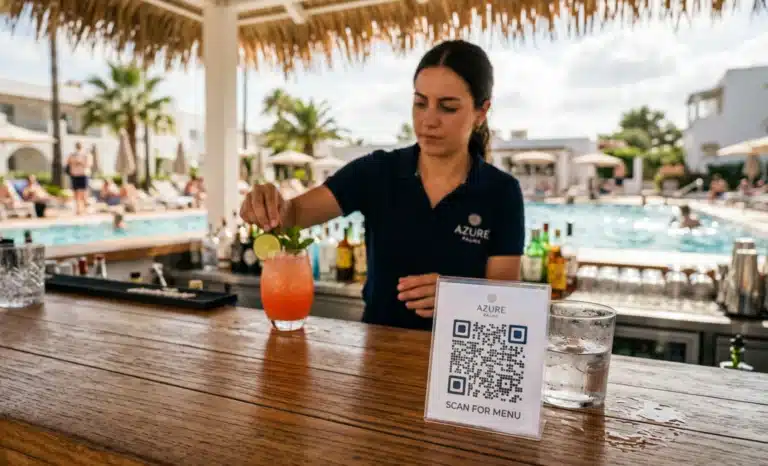
Building a QR code drink menu for poolside and terrace service is not the same as putting your indoor cocktail list online. Sun glare, wet hands, sticky bar tops, international guests, and a demand curve that spikes between two and six in the afternoon all change the requirements. This guide walks bar managers and F&B leads through designing the menu, choosing materials that survive outdoors, adapting the bar workflow, and measuring whether the system works.
Why does a QR code drink menu for poolside and terrace service make sense?
A drink menu changes far more often than a food menu, which is exactly why it deserves its own QR code. Daily specials, seasonal cocktails, weather dependent options, and bottles running out mid service all demand quick edits. A dedicated drink menu QR keeps the bar agile without touching the food menu at all.
Think about a normal week at a pool bar. A frozen cocktail sells out by four. A heat wave makes spritzes the obvious push. A new rosé arrives Thursday. With a printed menu, none of that reaches guests until the next print run. With a dedicated QR drink menu, the bar updates the link behind the code and every guest who scans sees the current offer immediately, while the kitchen’s menu stays untouched.
How do you design the drink menu itself for a phone screen?
Design the menu around how people actually browse on a phone from a lounger: short categories, short descriptions, and the information that prevents a follow up question. The goal is that a guest can find a drink, check what is in it, and place an order without flagging down a server.
Categories that work well on mobile follow the natural decision path: signature cocktails first, then classic cocktails, wine by the glass, beer and cider, spirits, non-alcoholic options, and hot drinks for the late afternoon crowd.
Each item needs three things. A short description that explains what the drink tastes like, not just its name. The alcohol content where relevant, because guests planning a full day in the sun genuinely care. And the key ingredients, so someone with a nut allergy or a gluten restriction can check before ordering rather than interrogating a busy bartender. Make non-alcoholic options a visible category of their own, not an afterthought at the bottom.
How does the bar workflow change when guests order by QR?
The order arrives at the bar already tagged with the lounger or table number, so the bartender prepares it without ever taking it. A runner delivers the drink to the right spot. The slowest part of peak service, leaving the counter to take orders, simply disappears from the bartender’s day.
This matters most during the hours hardest to staff for. At a pool or rooftop, demand concentrates into a few hot hours, loungers are spread across a large area, and every trip to take an order is time not spent shaking, pouring, or garnishing. With QR ordering, tickets queue with location context, the runner closes the loop, and the bartender’s job narrows to the one thing only they can do: make the drink well and fast. Guests notice shorter waits; the bar serves more covers with the same team.

Why are dynamic QR codes essential for an outdoor drink menu?
A static code locks the bar to one menu version forever, because the destination printed into it can never change. A dynamic QR code points to a destination the bar controls, so the drink menu behind it can be updated at any time without reprinting anything.
This distinction matters more for drinks than for almost any other hospitality use. Food menus might change quarterly. Drink menus shift weekly, sometimes hourly when a keg blows or the last bottle of a featured wine goes out. Outdoor materials make the problem worse: laminated cards and engraved bar tops are expensive to produce and painful to replace. If the code on them is static, every menu change means new signage across every lounger, table, and umbrella.
With a dynamic platform like QRCodeKIT, the physical code on the lounger stays identical all season while the menu behind it evolves. Print once in spring, update all summer.
How do you serve multilingual guests at the pool or terrace?
International guests ask the same questions in every language: what is in this cocktail, how strong is it, is there a gluten-free beer, what do you recommend that is not too sweet. A conversational AI layer on the menu page answers those questions in the guest’s own language, so the bar team is not translating ingredient lists mid rush.
This is where Cleo, the conversational AI built into QRCodeKIT, fits naturally. The guest scans the code, lands on the drink menu, and finds a conversation bubble ready to help. They ask in German whether the signature spritz contains added sugar, or in French which cocktails work without alcohol, and get an answer in seconds. The bar configures the content once; Cleo handles the languages. Bartenders stop fielding the same five questions in eight languages, and guests who would hesitate to ask in a foreign language order with more confidence.
What materials and design choices survive sun, water, and wear?
An outdoor QR code gets splashed, rubbed with sunscreen, scratched by glasses, and blasted by ultraviolet light for months. The materials and the visual design of the code decide whether it still scans in August.
- Materials: use waterproof stickers, laminated cards, or printed surfaces rated for outdoor use. Standard paper will fade, warp, or peel within weeks of pool exposure.
- Size: keep the code at a minimum of 3×3 cm for poolside placement. On rooftop terraces where guests scan from across a table, go larger.
- Contrast: a dark code on a light background scans best in bright sun. Colored backgrounds that look elegant indoors often lose the contrast a camera needs under glare.
- Placement: position the code where a guest can see it from a lying or seated position, integrated into the bar top, the table, the lounger arm, or the umbrella base. Never hidden under a glass or behind a centerpiece.
One field test saves a season of frustration: at two in the afternoon, in full sun, with wet hands, try to scan every placement. If any code needs a second attempt, fix it before opening weekend.
What operational habits keep the system running smoothly?
Tag each lounger and table with a unique identifier so every order arrives with its location attached, and use the same QR system at the bar top and across the loungers so guests learn one behavior that works everywhere in the venue.
Real time stock control protects the guest experience most. Set the menu to mark items as out of stock the moment the bar runs dry, so nobody orders a cocktail that cannot be served and waits twenty minutes to find out.
Upsells belong in the menu too, but with restraint. A suggested small bite next to a cocktail, or a pairing note under a wine by the glass, reads as helpful. Pushy add ons read as pressure, and poolside guests are there for comfort.
How do you measure whether the QR drink menu is working?
A handful of metrics tell the real story. Average ticket size during peak hours shows whether descriptions and pairing suggestions move spend. Order completion time, from scan to delivery, reveals whether the bar workflow is actually faster than the old routine.
Beyond those, items ordered by lounger location show how demand maps across the venue, which helps with runner routing. Language preferences detected through scans reveal which translations matter for your guest mix. Engagement by drink shows which items get viewed and ordered, which get viewed and skipped, and which nobody finds, a direct signal for the next menu revision. Review the numbers weekly in high season; a dynamic menu lets you act on them the same day.
What are the most common mistakes with poolside QR menus?
Most failures come from treating the outdoor code like an indoor one. The environment punishes shortcuts that would go unnoticed in a dining room.
- Codes printed too small to scan in sunlight, forcing guests to hover and retry.
- Low contrast designs placed against colored umbrellas or patterned fabric.
- Static codes that lock the menu and prevent seasonal or daily updates.
- No item descriptions, leaving guests guessing what a signature cocktail contains.
- Non-alcoholic options missing or buried, alienating a growing share of guests.
- No clear “scan to order” prompt, so guests assume the code is just information.
Each of these is cheap to fix before launch and expensive to discover through slow service in July.

Frequently asked questions
Do guests need to download an app to use a QR drink menu?
No. The guest scans the code with their phone camera and the menu opens in the browser. There is no download, no login, and no account creation.
How big should a QR code be at a pool or on a terrace?
A minimum of 3×3 cm works for poolside placements scanned from close range. For terraces and rooftops where the code sits across a table, print it larger so cameras can read it from a natural seated position.
Can the drink menu show items as out of stock in real time?
Yes, and it should. A dynamic QR menu lets the bar mark an item unavailable the moment it runs out, and the change appears instantly for every guest who scans afterward.
Does bright sunlight affect QR code scanning?
Direct sun reduces the contrast a phone camera relies on. A dark code on a light, non-reflective background, printed at adequate size, scans reliably even at midday.
Can one QR code serve both the bar top and the loungers?
The same drink menu can sit behind every code in the venue, but each lounger and table should carry its own identifier so orders arrive at the bar with location context. Guests get one consistent experience; the bar gets precise routing.
All images and visual content in this article were created using RealityMAX.