TL;DR
- AI-generated QR codes blend a working QR pattern with custom visuals, so the code looks like part of your brand instead of a plain black-and-white square.
- They stay fully scannable on any phone while carrying the same data as a standard code.
- With QRCodeKIT you can create one in minutes, link it to almost any destination, and update or track it because every code is dynamic.
- You can start on the free plan with no credit card required.
AI-generated QR codes are functional QR codes given a custom, brand-aligned design by artificial intelligence. They carry the same data as an ordinary code, yet they look far better on packaging, posters, or screens. This guide explains what they are, how they work, where to use them, and how to create your own with QRCodeKIT.
What are AI-generated QR codes?
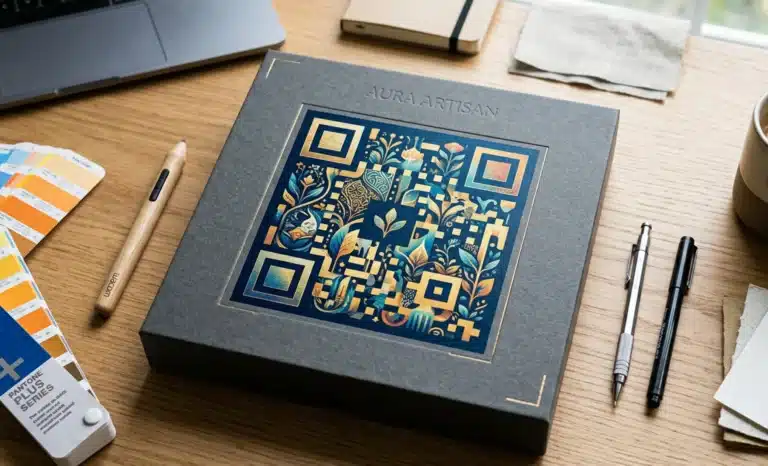
AI-generated QR codes are standard QR codes enhanced by artificial intelligence to carry creative visual elements such as colors, textures, gradients, and backgrounds. They keep the functional structure that makes a code readable, so they stay scannable on any mobile device while looking like a designed brand asset rather than a generic square.
Instead of relying on a basic QR code generator that outputs identical black-and-white grids, AI tools produce unique, on-brand results. The effect is a kind of QR code art, where the visual layer is shaped to fit a campaign without breaking the data underneath.
How are AI-generated QR codes different from regular QR codes?
The difference is visual, not structural. A regular QR code is rows of black-and-white squares on a fixed grid. An AI-generated QR code keeps that same readable structure but layers creative design on top, guided by your colors, style references, or a written prompt, so the code matches your brand instead of clashing with it.
The data stays intact underneath. Whether the code points to a URL, a vCard, or contact details, scanners read it the same way. What changes is how the code looks, which is exactly what matters on a product label, a poster, or a storefront where design carries weight.
Why should you use AI-generated QR codes?
You should use AI-generated QR codes when appearance affects results. A code that fits your brand draws more attention than a plain square, and attention is what turns a passing glance into a scan. For marketing materials where first impressions count, that visual lift can meaningfully improve engagement.
The benefits show up in a few clear ways:
- Stronger branding, because the code matches your visual identity instead of interrupting it.
- Higher engagement, since people are more inclined to scan a code that looks intentional.
- Flexibility, with designs that adapt to any campaign or format.
- Consistency across print and digital platforms, so every touchpoint feels like the same brand.
By turning a functional tool into a branded visual element, AI-generated QR codes can lift the performance of your marketing materials without adding any friction for the person scanning.
How do AI-generated QR codes work?
Creating an AI-generated QR code with QRCodeKIT is a short, guided process. You enter the destination you want the code to point to, such as a website URL, a digital vCard, a downloadable file, or a social profile. Then you set a design direction, and the AI builds a code that balances creativity with reliable scanning.
You can start from a ready-made template, apply your brand colors, or describe the look you want with a prompt. Once the generated QR code is ready, you review it, adjust if needed, and download it as a high-quality PNG or vector file for both print and digital platforms.

Where can you use AI-generated QR codes?
You can use AI-generated QR codes almost anywhere a regular code fits, and they perform best where design matters. Common placements include product packaging, flyers, posters, event tickets, menus, and storefront displays. Online, they sit naturally on websites, landing pages, and social profiles, reaching people on screens as well as in print.
Because the visual quality is higher, these codes work especially well on premium materials. A luxury label or a carefully art-directed poster can include a code that supports the design instead of undercutting it, while still giving people a quick route to your digital content.
What content can AI-generated QR codes link to?
AI-generated QR codes can link to almost any digital destination. With QRCodeKIT that includes plain links and URLs, product pages, portfolios, special offers, app downloads, and digital business cards. Whatever the goal, sharing a menu, promoting a launch, or handing over contact details, the code can carry it while still reflecting your brand style.
Because the destination is editable, you can point the same printed code at a new page whenever your campaign changes, so a single design keeps working long after it leaves the printer.
Are AI-generated QR codes safe to scan?
Yes. Created on a reputable platform like QRCodeKIT, AI-generated QR codes are safe to scan. The tool preserves the functional QR structure, so the code reads reliably on any mobile device, and you control exactly which URL or content it points to, which means there are no hidden or unexpected destinations behind it.
Every QRCodeKIT code is dynamic, so you can change its destination or deactivate it at any time. If a link ever needs to be retired or redirected, you can do it without reprinting anything, which adds a practical layer of control and safety.
How do you print AI-generated QR codes?
Printing is straightforward. Once your code is generated, download it as a high-quality PNG or a vector file built for print. Keep the printed size large enough to stay scannable and leave an adequate margin, the quiet zone, around it. Both steps protect readability once the code leaves the screen.
A tip worth repeating: always test the printed version with a few different phones before committing to a full run. Intricate designs can occasionally trip up older scanners, and a quick check on real materials catches problems while they are still cheap to fix.
Can you customize AI-generated QR codes with your logo?
Not directly yet. At this stage, AI-generated QR codes do not support built-in logo placement, and that feature is still in development. If a logo is essential, the practical route is to use the full custom QR code design tools already in QRCodeKIT, which let you add a logo, set colors, and apply backgrounds today.
In the meantime, it helps to refine your AI prompts now so your creative direction is ready. When logo integration arrives, you will already know the style that works, and you can apply it to on-brand AI QR codes without starting over.
Do AI-generated QR codes work on all mobile devices?
Yes, as long as they are made with a reliable generator like QRCodeKIT. The platform keeps codes compatible with modern smartphones and tablets, whether people scan with a native camera app or a third-party reader. The functional pattern stays intact, so everyday scanning works the same as it does with a standard code.
Testing across a couple of common devices is still a sensible habit, especially for more experimental designs. Well-made AI QR codes hold up in real conditions, but a quick check removes any doubt before your code goes out into the world.
Can you generate AI QR codes for free?
Yes. You can create AI-generated QR codes on the QRCodeKIT free plan, with no credit card required. That lets you experiment with AI styling, test different looks, and download QR code images for both print and online use before committing to anything.
Paid plans unlock more advanced capabilities, including tracking, editable destinations, bulk creation, and API access. If your needs grow beyond casual experimentation, upgrading gives you the analytics and scale that larger campaigns tend to require.
How do AI QR codes improve tracking and analytics?
Because every QRCodeKIT code is dynamic, your AI QR codes come with built-in analytics. Each scan can record useful data such as scan counts, location, time of day, and device type, along with campaign attribution. That turns a printed code into a measurable marketing touchpoint rather than a one-way link.
With those insights you can compare placements, test different creative approaches, and see which marketing materials actually drive scans. Over time, that feedback loop helps you spend effort where it works and quietly drop the placements that do not.

Can you use AI-generated QR codes via API?
Yes. QRCodeKIT offers API access for teams that need to automate or integrate code generation. Through the API you can create batches of AI-generated QR codes, update destinations programmatically, and tailor codes to individual customers, which makes it practical to scale across large campaigns or full product catalogs.
This matters most when manual creation can no longer keep up, for example across thousands of product variants or a round of personalized mailings, where automation saves real time without sacrificing brand consistency.
Can you embed AI-generated QR codes on websites?
Yes. Once created, an AI-generated QR code can be embedded on any web page, blog post, product listing, or landing page. That extends its reach beyond print, letting people scan directly from one screen using the device in their hand, which is increasingly common in app-install and promotional flows.
You can also drop the code into email campaigns, giving recipients a fast way to act on your message. The same code works across both worlds, so a single design can travel from a printed flyer to a newsletter without any rework.
Can you use AI QR codes with templates?
Yes. QRCodeKIT pairs ready-made templates with full creative control. You can begin from a base template for speed, then refine the result by adjusting colors and guiding the AI with prompts. The trade-off is simple: templates get you to a usable code faster, while manual direction gives you more distinctive results.
For most projects you will land somewhere in between, starting from a template to save time and then steering the design until it feels unmistakably yours.
What types of businesses benefit from AI-generated QR codes?
Almost any business that already uses QR codes can benefit. Retailers can put on-brand codes on packaging, restaurants can design menu codes that match the room, and event organizers can create ticketing codes people actually remember. Wherever a code appears in public, a better-looking one tends to get scanned more.
The appeal scales from small startups to established brands. If visual identity matters to you, and for most businesses it does, AI-generated QR codes turn a routine utility into another surface where your brand can show up consistently.
How do you get started with AI-generated QR codes?
Getting started takes only a few minutes. Sign up for the QRCodeKIT free plan, with no credit card required, enter your link or URL, choose a design direction, and let the AI generate the code. You can preview it, make changes, and download it for use across print and digital platforms.
From there, the same code can grow with you. Because it is dynamic, you can update its destination, track its performance, and reuse it across campaigns, turning a quick first experiment into a lasting brand asset.
All images and visual content in this article were created using RealityMAX.