

April 29, 2026
European Accessibility Act: QR code requirements

The European Accessibility Act entered into force on 28 June 2025. For businesses operating in or selling to the EU, it marks a genuine shift in how digital experiences are evaluated. Not just websites. Not just apps. The full chain of interaction, including what happens when someone scans a QR code.
That connection is still underestimated. A QR code is, in isolation, just a printed pattern. But it is also the entry point to a digital service. And it is the digital service, not the code itself, that the EAA is designed to reach.
What the European Accessibility Act actually covers
The EAA is a directive. It sets harmonized accessibility requirements across EU member states, replacing a landscape of diverging national laws with a consistent baseline. Its goal is to ensure that people with disabilities can access the same products and services as everyone else, without friction and without workarounds.
The directive applies to a defined list of products and services placed on the EU market. On the services side, this includes ecommerce, banking services, transport service information, electronic communication services, audiovisual media services, ebooks, and consumer-facing digital services more broadly. On the products side, it covers computers, smartphones, ticketing machines, check-in machines, and ATMs, among other relevant consumer equipment.
Microenterprises providing services are exempt under specific conditions. If a business has fewer than 10 employees and an annual balance sheet total or annual turnover below two million euros, the service exemptions do not apply to them. The product requirements are different and remain in force regardless of business size. If you are unsure how the exemption applies to your situation, a compliance professional can give you a clearer answer than any article can.
The EAA aligns closely with the Web Content Accessibility Guidelines at the 2.1 AA level. If your digital content meets WCAG 2.1 AA, you are working from the right foundation.
Where QR codes fit in the EAA scope
A QR code printed on a restaurant table, a museum wall, a product package, or a transport terminal is not the subject of the law. The destination is.
When scanning a QR code leads a user to a digital service that falls within the EAA’s scope, that service must meet the accessibility requirements. The format of the entry point does not change that obligation. A banking service reachable by QR code must be as accessible as one reachable by a URL typed directly into a browser. A transport information page triggered by a scan must meet the same standards as one found through a search engine.
This matters practically because many QR-linked destinations were built quickly, often as stopgaps. A PDF menu behind a QR code. A non-responsive product page. A reservation form that cannot be navigated without a mouse. These are the kinds of experiences the EAA exists to fix, and QR codes are one of the most common ways users encounter them.
What accessibility means for the destination behind a QR code
Meeting the EAA’s accessibility requirements for a QR-linked destination means aligning with WCAG 2.1 AA. In practical terms, that covers several areas.
Screen reader compatibility requires that the content behind a QR code can be read and navigated by assistive technologies. This means semantic HTML, proper heading structure, and meaningful alt text on all non-decorative images. A page that renders correctly visually but is built entirely in non-semantic markup will fail.
Color contrast is a concrete, testable requirement. Text must meet a minimum contrast ratio against its background. Low-contrast menus, pricing grids, or call-to-action buttons designed purely for aesthetics often fall short.
Keyboard navigation means that every interactive element on the page, including forms, buttons, menus, and links, must be operable without a mouse or touchscreen. Many QR-linked experiences use modal overlays or custom UI components that are never tested for keyboard access.
Time-limited interactions are also a concern. If a session expires or a prompt disappears after a fixed time, there must be an alternative. A user relying on a screen reader or other assistive technology may take longer to complete a task. That extra time cannot result in data loss or an inaccessible state.
The physical side: the QR code itself
The EAA’s reach extends to the physical context in which a QR code appears. This is an area where many businesses have gaps they may not even know about.
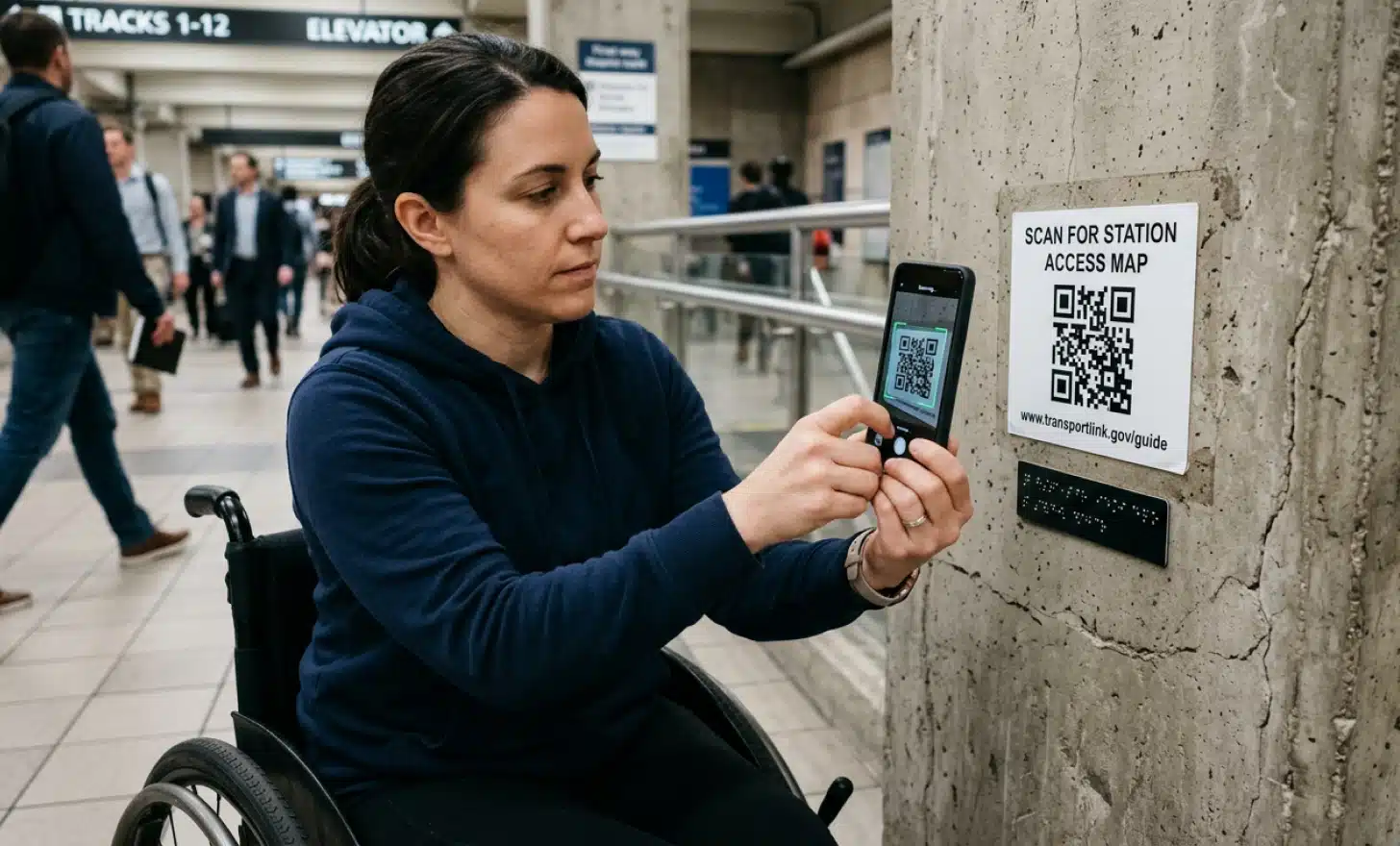
A QR code that cannot be scanned because it is too small, printed at too low a contrast, surrounded by insufficient quiet zone, or placed at an inaccessible height creates a barrier before the digital experience even begins. A code mounted two meters up a wall is not accessible to a wheelchair user. A code printed in light gray on a cream background may not scan at all for some devices.
The EAA’s functional requirements also expect that an accessible alternative is available alongside the QR code in physical contexts. A user who cannot scan a code, whether because of a motor impairment, a low-end device, or a screen that is cracked, should have another way to reach the same information. That alternative might be a short URL printed beside the code, an NFC chip, or a visible phone number or email address. The principle is that the QR code should not be the only door.
Put it into practice
Try QRCodeKIT Pro free for 7 days and see it work. No credit card required.
Start free trialMultilingual and conversational accessibility
One dimension of accessibility that the EAA reflects, and that is still underserved by most QR-linked experiences, is language. A user who is not fluent in the local language of a service faces a barrier that is real, even if it is not always treated as one. Relay services, translated support, and multilingual digital content are all part of how the EAA thinks about equal access.
A static page translated into one or two languages gets part of the way there. A conversational layer that responds in the user’s own language goes further. QRCodeKIT’s Cleo is one example of how this works in practice. When a user scans a QR code powered by Cleo, they find an AI assistant ready to answer questions directly, in whatever language they choose. The business owner configures the content once; Cleo handles the conversation. No download, no login, no language barrier.
That kind of conversational accessibility also benefits users who struggle with dense or poorly structured text. Instead of navigating a long page to find the information they need, they can ask a question and get a direct answer. For users relying on assistive technologies or simply unfamiliar with the format of the content, that matters.
Common mistakes that put businesses at risk
Most EAA compliance gaps in QR code deployments are not intentional. They are oversights. The following are the ones that come up most often.
PDF menus or documents linked from a QR code are a frequent problem. PDFs are not inherently inaccessible, but an untagged or image-only PDF is essentially invisible to a screen reader. If your QR code leads to a scanned PDF of a printed menu, it does not meet the standard.
Low-contrast or undersized codes are often treated as a design choice rather than an accessibility concern. They are both. A code that cannot be easily scanned creates a barrier before the digital content is even reached.
Destinations not optimized for screen readers are probably the most common gap. These pages often look fine visually but have no meaningful structure underneath. Testing with an actual screen reader, or at minimum a tool like axe or WAVE, reveals issues quickly.
Lack of alternative access methods is the physical-context gap mentioned above. If the QR code is the only way to reach the information, and someone cannot scan it, there is no accessible path.

A practical compliance checklist for QR code deployments
Before any QR-linked experience goes live in the EU, it is worth working through the following:
- The destination page passes a WCAG 2.1 AA automated test and has been reviewed for keyboard navigation and screen reader compatibility.
- All images on the destination page have meaningful alt text.
- Text and interactive elements meet minimum color contrast ratios.
- The page is fully usable on a mobile device without a mouse.
- No content is exclusively time-limited without an accessible alternative.
- The physical QR code is printed at sufficient size and contrast, with adequate quiet zone.
- The QR code is placed at a height accessible to wheelchair users.
- An accessible alternative (URL, phone number, NFC) is available alongside the code.
- If the service is multilingual or serves a linguistically diverse audience, content is accessible in relevant languages or through a responsive conversational layer.
Frequently asked questions about the EAA and QR codes
Does the EAA apply to my business if I am not based in the EU?
If your business places products or services on the EU market and you are not a microenterprise, the EAA applies to you. The location of your headquarters is less relevant than the location of your customers.
Is my restaurant menu covered if it is only available via QR code?
If your restaurant operates in the EU and your menu is a consumer-facing digital service, the EAA’s requirements are relevant. A non-accessible PDF or a page incompatible with screen readers would be a concern. The practical standard is whether a user with a disability can access the same information as any other customer.
What happens if my QR-linked page is not accessible?
The EAA gives enforcement authorities in each EU country the power to act on non-compliance. The directive does not specify uniform fines; country-specific requirements will vary. The more relevant risk for most businesses is not the fine but the exclusion: a significant portion of the population cannot access your service, and increasingly that is a legal and reputational problem, not just an ethical one.
Does WCAG 2.1 AA compliance automatically mean EAA compliance?
WCAG 2.1 AA is the technical foundation the EAA builds on, and meeting it covers most of the digital accessibility requirements. But the EAA also includes functional requirements for physical contexts and product categories. Full compliance means addressing both.
What is an undue burden under the EAA?
The EAA allows that accessibility requirements do not apply where they impose a disproportionate burden on the economic operator. This is assessed case by case, considering the cost of compliance against the size and resources of the business, the estimated use by people with disabilities, and the benefit to users. It is not a blanket opt-out, and decisions need to be documented and justified to enforcement authorities.
All images and visual content in this article were created using RealityMAX.
Related articles
QR code on TV commercials
TV is back in the performance marketer’s toolkit. Not because the medium changed, but because the phone in the viewer’s hand now closes the loop that broadcast…
AI powered QR code management
There is a version of AI-powered QR code management that sounds compelling in a product announcement and falls apart the moment you try to run it at scale. A…

QR codes for rental properties and vacation homes
It’s 11:47 PM. A guest just arrived at your vacation rental after a delayed flight. They can’t figure out the Wi-Fi password. The printed welcome book is…
Try QRCodeKIT Pro free for 7 days.
No credit card required. The original dynamic QR code platform since 2009.
