TL;DR
- Vibe coding QR codes is a simple way to share and host the HTML files that AI tools like Claude and ChatGPT now generate on the fly.
- Instead of attaching a file to a chat and asking people to download it, you upload the HTML to a dynamic QR code using the file download type and get back a short link plus a scannable code.
- It works for internal dashboards, client demos, quick documentation, and interactive prototypes, with no GitHub account, deploy step, or developer URL involved.
- It is built for artifacts rather than full production apps, but it handles more than you would expect, including HTML that talks to services like Firebase.
A few months ago, sharing an AI-generated dashboard usually meant attaching an HTML file to a chat message and asking people to download it, double-click it, and open it in a browser. It worked, barely. Vibe coding QR codes turns that awkward ritual into a short link and a scannable code. If you are generating HTML with AI faster than you can figure out how to share it, this guide walks through a workflow that is already sitting inside a tool you may have used for something completely different.
What is vibe coding?
Vibe coding is the practice of building software by describing what you want in plain language and letting an AI model write the code. Andrej Karpathy coined the term in early 2025, and within months it traveled from a single post to Collins Dictionary’s Word of the Year. The idea is simple. You talk, the model builds.
Most of the time you are not even setting out to write code. You ask an assistant for a strategy summary, a pricing comparison, or a reference card, and it decides the cleanest answer is a small interactive web page. You did not plan to make HTML. You have HTML anyway. Call it incidental coding. The output is real and useful, and now you need somewhere to put it.
Why is sharing an AI-generated HTML file so awkward?
Sharing a single HTML file is awkward because almost every tool built for the job was designed for developers. GitHub Pages, Netlify, Vercel, and CodePen all assume you are comfortable with repositories, deploys, command lines, or editor interfaces. For someone in marketing or operations, that is a surprising amount of friction for one file.
GitHub Pages is the standard answer, and it is the wrong one for most non-developers. It assumes you have an account, that you understand repositories, that you do not mind waiting for the deploy, and that a URL reading username.github.io/repo-name is acceptable. Netlify Drop is closer, since you drag a folder and get a link, but the netlify.app address still tells whoever receives it that they are being sent to a developer tool. Vercel expects a connected Git repository or its command line. CodePen and JSFiddle wrap your page in their own editor, which is great when you want feedback on the code and wrong when you just want someone to use the result.
That leaves the option most people quietly default to. Send the file in chat, ask people to download it, ask them to double-click. It is the 1996 path, and it is the one worth retiring.
How do vibe coding QR codes work?
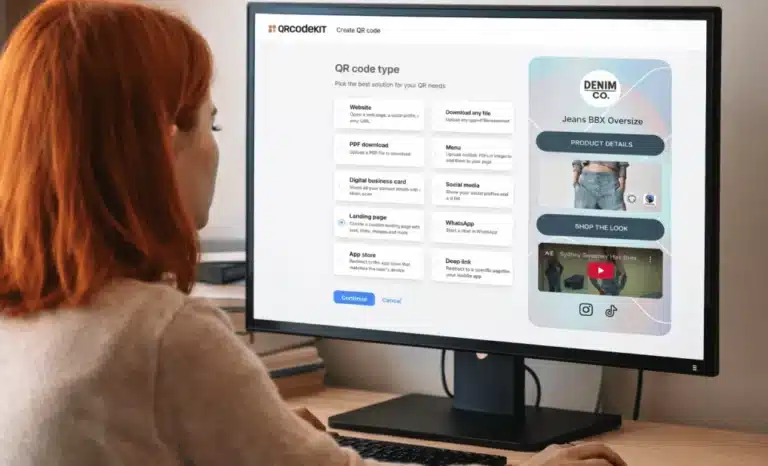
Vibe coding QR codes work by hosting your HTML file behind a dynamic QR code instead of sending the file itself. In QRCodeKIT you create a new dynamic QR code, choose the file download type, upload your HTML, and save. You get back a short link and a matching QR code, both pointing to the same hosted page. The whole thing takes under a minute.
The steps look like this:
- Log into your account.
- Create a new dynamic QR code and choose file download as the type.
- Upload your HTML file.
- Save. You can skip the design and customization step if all you need is the link.
What you get is a short link in the form qrkit.co/XXXXXX and a dynamic QR code that resolves to the same place. Click the link or scan the code, and the HTML renders directly in the browser. The file lives on the platform’s CDN, so it loads the same way on desktop and mobile. Because the code is dynamic, you can update the file later, customize the slug into something readable, or swap in your own domain, all without changing the link or reprinting anything you have already shared.

What can you do with QR code hosting?
QR code hosting is useful any time you need to put an AI-generated page into someone’s hands quickly. The strongest scenarios are internal team sharing, client and stakeholder demos, lightweight documentation, and interactive prototypes. In each case the short link or the scannable code removes a step that used to slow things down.
For internal team sharing, it replaces the download dance entirely. You send a qrkit.co link in chat, a colleague clicks it, and the dashboard opens. Nobody has to know what HTML is or go hunting through a downloads folder. For client and stakeholder demos, the QR code itself is the unlock. When you are presenting AI-generated work in a meeting and you want people to interact with it on their phones, a code on the screen is faster than reading out a URL. For internal documentation, you can generate a single-page reference with AI and host it without involving your IT team or fighting a SharePoint setup. And for prototype sharing, the kind of interactive prototype that has become normal with tools like Claude and v0, you can put a working version straight into someone’s hands. They scan, they use it, and there is no repository to clone and no dev server to run.
Does the HTML file need to be fully self-contained?
No. A common assumption is that the HTML has to be a single self-contained page with no external calls, but that is too cautious. Static HTML that connects to public services works fine. The real constraint is not “no backend.” It is “no backend running on your own machine.”
If your page talks to something reachable from the public internet, such as Firebase, Supabase, a public API, or your own server hosted elsewhere, the hosted HTML can reach it too. An internal team tool that calls Firebase for authentication and persistent state runs exactly as it would from any other host. What does not work is a backend living at localhost:3000, because nobody else can reach your local machine through that address.
Is there a size limit for HTML hosted this way?
Yes. The current limit is 50MB per file, which comfortably covers any single-page HTML, including pages with images embedded as base64. You will only run into the ceiling with large embedded videos or very big datasets baked into the file.
Beyond raw size, there is a softer complexity ceiling. A very demanding page with heavy database queries, real-time sync across many simultaneous users, or expensive client-side computation may start to show its seams. For most generated artifacts that point is a long way off, but it is worth knowing the limit exists before you push the workflow toward something it was never meant to carry.
When should you use real web hosting instead?
Use real hosting when you are launching a production application rather than sharing an artifact. If your project needs a custom domain, continuous deployment, edge functions, or infrastructure that has to exist independently of any single page, reach for a platform like Vercel or your own setup. The QR workflow is built for things that deliver value the moment they open.
The line between an artifact and an application is fuzzier than it sounds. An artifact is useful as soon as it is opened, sometimes with a bit of external state attached. An application needs production infrastructure to exist at all. The QR-hosting flow is best at the first and stretches into the second further than you might expect, but it is not a replacement for a real deployment pipeline.
Why does this workaround exist at all?
This workaround exists because AI tools now let almost anyone generate HTML, while the tools for sharing that HTML still assume you are a developer. The number of people producing interactive web content without thinking of themselves as web developers has jumped enormously, and the sharing infrastructure has not kept pace.
Claude, ChatGPT, v0, Gemini, and others now produce working interactive content inside ordinary conversations. The platforms built to share that kind of file were made for developers passing code to other developers, and they carry all the assumptions that come with that. Purpose-built sharing is on the way. AI vendors are already building it into their own products, with Claude letting people build and publish small apps directly from inside the assistant. Until that layer is mature for every use case, a tool from an earlier era turns out to be the simplest path. A QR code generator was made for posters and packaging. It also happens to be one of the fastest ways to put an HTML file online and get a short link back. The fix is not elegant. It works.
If you are shipping AI-generated work faster than the platforms can ship ways to share it, hosting your HTML on a dynamic QR code is a quick way through. Generate the page, upload it as a file download, and send the link or show the code. The next person just scans and uses it.
All images and visual content in this article were created using RealityMAX.