

Quiet zone requirements for QR codes: the four-module rule explained
TL;DR
- Quiet zone requirements for QR codes are defined in ISO/IEC 18004: a minimum clear margin of four modules on all four sides of a standard QR code.
- The quiet zone lets scanners isolate the finder patterns from surrounding visual noise. Without it, a technically valid code can fail to scan at all.
- Quiet zone size in physical units equals module size multiplied by four. A code with 0.5 mm modules needs a 2 mm margin on every side.
- Micro QR and rMQR variants use reduced requirements, and materials like fabric, metal, and curved packaging call for extra margin beyond the minimum.
Quiet zone requirements for QR codes are set by ISO/IEC 18004, the international standard that defines the QR code symbology. The rule is simple: a minimum clear margin of four modules on all four sides. This article is the complete reference on that rule, its exceptions, and how to apply it.
What is the quiet zone on a QR code?
The quiet zone is the mandatory clear margin surrounding a QR code that allows scanners to detect the code boundaries. ISO/IEC 18004 specifies a minimum quiet zone of four modules on all four sides of a standard QR code. It is part of the symbol itself, not optional decoration.
Many teams treat the quiet zone as decoration and crop it when a layout gets tight. When a code that looks fine refuses to scan, the usual suspects are size, contrast, or resolution. In practice, a missing or invaded quiet zone is often the real cause, because the scanner cannot even find the code before it tries to read it.
This piece goes deep on one topic only. For the broader picture of how a QR code is built, our article on QR code anatomy covers finder patterns, timing patterns, and data regions.
What are the quiet zone requirements for QR codes under ISO/IEC 18004?
ISO/IEC 18004 requires a quiet zone of at least four modules of light background on each of the four sides of a standard QR code. The requirement applies to every version of the standard symbol, from the smallest 21×21 module grid to the largest 177×177 grid.
The standard was originally published in 2000 and has been revised since, most recently in 2015. Across revisions, the four-module minimum for the standard symbol has remained stable. The margin is measured in modules, not in millimeters or pixels, which is why its physical size changes with the size of the printed code.
One detail matters for compliance. The specification defines the quiet zone as an area with the same reflectance as the light modules. Anything printed inside it, even faint decoration, breaks the requirement.

What does the four module rule mean in practice?
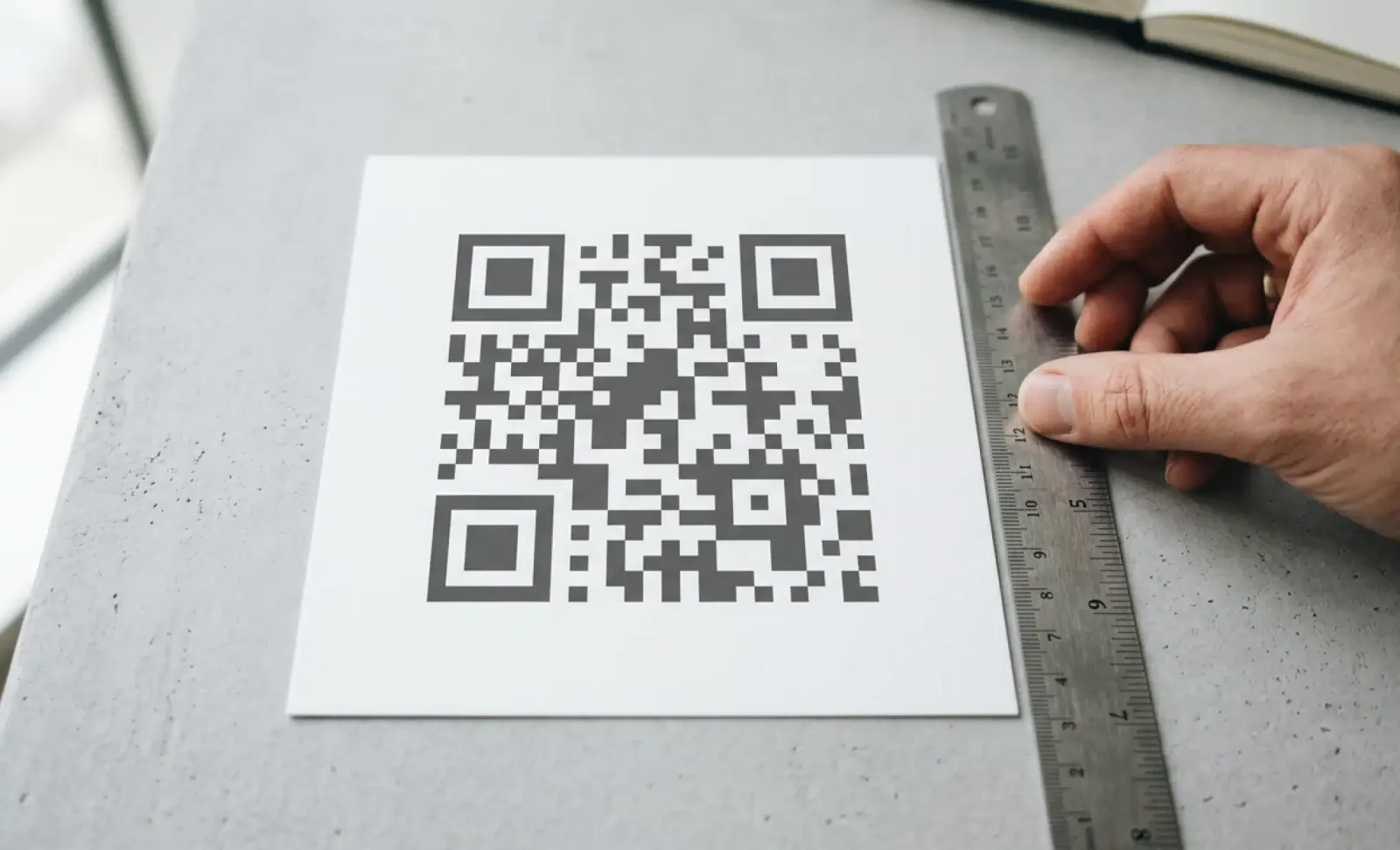
The four module rule means the quiet zone must be at least as wide as four modules of the specific code you are printing. A module is the smallest unit of the QR grid, one single black or white square in the matrix. Multiply the module size by four and you have the minimum QR code margin in physical units.
Two worked examples make this concrete. A version 1 QR code has a 21×21 module grid. Printed at 2×2 cm, each module measures roughly 0.95 mm (20 mm divided by 21 modules), so the quiet zone must be at least 3.8 mm on each side, for a full footprint of about 27.6 mm. Scale the same code up to 5×5 cm and each module grows to roughly 2.38 mm, so the minimum quiet zone becomes about 9.5 mm per side. Same code, same rule, very different physical margin.
The general formula: measure one module, multiply by four, apply that clear space on all four sides. A code built with 0.5 mm modules needs a 2 mm quiet zone. A code with 1 mm modules needs 4 mm. The quiet zone size scales with the code, never independently of it.
Why do QR codes need a quiet zone?
The quiet zone exists because of how scanners locate a code. They search the image for the three finder patterns, the large squares in three corners of the symbol. Each finder pattern produces a distinctive 1:1:3:1:1 ratio of dark and light modules along any line through its center, and that ratio is what the detection algorithm hunts for.
The algorithm can only recognize that ratio if the finder patterns stand apart from their surroundings. When text, borders, or background patterns sit directly against the code, they blend into the same visual field and corrupt the ratio the scanner is looking for. The code may be flawless internally, yet the scanner never isolates it from the surrounding noise.
This is why quiet zone failures behave differently from damage. A scratched code often still scans thanks to error correction. A code with no clear margin frequently produces nothing at all, because detection fails before decoding ever starts.
Do all QR code variants have the same quiet zone requirements?
No. ISO/IEC 18004 defines different minimums for different symbol types, and the differences matter when space is constrained.
Micro QR codes were designed for very small labels, electronic components, and tight packaging, so the specification halves the margin to two modules. The rectangular Micro QR, added in later revisions, extends that logic to elongated spaces such as cable labels and slim product edges.
If your layout truly cannot accommodate a four module margin, the correct move is a smaller symbol type with a legitimately reduced requirement, not cropping the quiet zone of a standard code. Micro QR and rMQR trade capacity and scanner support for size, so they suit industrial and controlled environments better than consumer campaigns.
What are the most common quiet zone mistakes in real designs?
Most quiet zone violations come from design decisions that look harmless on screen. These are the patterns that appear again and again in production files:
- Cropping the quiet zone to fit a tight layout, usually the last step before sending a file to print.
- Placing text, borders, or decorative patterns inside the margin, including “scan me” labels pushed too close to the code.
- Assuming the quiet zone must be pure white. Any light color that contrasts clearly with the dark modules works, though white gives the widest safety margin.
- Using a QR image that already includes its quiet zone, then placing another element inside that built-in space because it reads as empty room.
- Overlaying the margin with translucent or watermark-style elements that look clean on a monitor but register as noise to a camera.
Each of these fails for the same reason: the detection logic treats anything inside the margin as part of the visual field it must separate the code from. Our article on QR code design rules covers the aesthetic side of this balance.
If a code still won’t scan once the margin is right, the QR code not scanning guide covers the other causes, from size and contrast to the link behind the code.
Put it into practice
Create a dynamic QR code free and see it work. No credit card required.
Get started freeHow do materials and surfaces change quiet zone needs?
The four module rule is the specification minimum, and on flat, matte paper it is normally sufficient as printed. Other materials introduce effects that erode the effective margin, so the safe practice is to extend beyond the minimum.
Fabric and textiles let ink bleed slightly along the fibers, eating into the margin from the inside. A quiet zone printed at exactly four modules can measure less after production, so add one or two extra modules to absorb the bleed.
Metal and glossy surfaces reflect light unpredictably. Glare near the edge can read as spurious dark or light regions, so a wider clear margin gives the scanner more clean signal.
Curved surfaces such as bottles and cans compress the perceived margin at the edges. Four modules measured flat can appear narrower once wrapped around a cylinder, so increase the physical margin on tighter curve radii.
Digital screens add their own noise. Pixel edges, anti-aliasing, and bezels near the code can interfere with edge detection, so a slightly larger margin on screen is a low-cost safeguard. For overall dimensions across these contexts, see our reference on QR code print size.
Does error correction compensate for a missing quiet zone?
No. Error correction and the quiet zone are independent controls that solve different problems. The quiet zone helps the scanner find the code. Error correction helps the scanner read the code once it has been found.
QR codes include Reed-Solomon error correction that can reconstruct data when part of the symbol is damaged, dirty, or covered. That resilience applies after detection has succeeded. If the quiet zone is missing and the finder patterns cannot be isolated, the decoding stage never runs, and no error correction level can rescue the scan.
This explains a common misdiagnosis. Teams facing scan failures raise the error correction level, regenerate the code, and see no improvement, because the failure was happening at detection, not decoding. Checking the margin first is faster than iterating on parameters that were never the problem.
How do you test quiet zone compliance before launch?
Testing takes minutes and catches the failure before thousands of units are printed. A reliable process:
- Measure the module size in the final printed code, using a ruler or caliper on a physical proof, not the digital file.
- Multiply that measurement by four for a standard QR code, or by two for a Micro QR.
- Confirm the measured clear margin exists on all four sides, checking against the nearest printed element, not the page edge.
- Scan with multiple devices, deliberately including older phones whose scanners are less forgiving than current flagships.
- Test in the real environment: the actual lighting, the realistic scanning distance, and the angles people will actually use.
The device variety in step four matters. Modern flagship cameras paper over marginal codes that older hardware rejects, and your test phone is rarely the least capable device in your audience’s pockets.

When can you reduce the quiet zone below four modules?
Almost never in uncontrolled conditions. Modern scanners with more capable computer vision can sometimes read codes with a reduced margin of two to three modules, particularly on flat, high-contrast, well-lit surfaces at close range. That capability describes the best case, not the field.
Older devices remain in circulation for years, and field conditions such as dim lighting, oblique angles, glare, and distance all tighten the tolerance a generous margin would otherwise provide. A code that scans instantly in an office test can fail on a restaurant table at night or a trade show wall under mixed lighting.
The four module rule is the safe floor that protects your code across every device and condition your audience brings to it. Reducing the margin is a bet against the least capable scanner in your audience, and you do not get to choose which scanner that is. If space is the constraint, shrink the data instead of the margin.
Why do dynamic QR codes make quiet zone maintenance easier?
Dynamic QR codes encode only a short redirect URL, so they need fewer modules than static codes carrying full payloads. Fewer modules means a lower version, larger modules at the same print size, and a physically smaller quiet zone relative to the design.
The math favors the shorter payload directly. A long URL pushes a code into higher versions with denser grids, shrinking the module size at a fixed footprint and tightening every print tolerance, including the margin. A dynamic code from QRCodeKIT stays at a low version regardless of where it points, because the destination lives behind the redirect and can change at any time without touching the printed pattern.
For designers in tight layouts, that is the practical benefit. A sparser grid with larger modules is easier to print accurately, easier to scan at distance, and easier to surround with a compliant four module margin.
What is the minimum quiet zone for a QR code?
The minimum quiet zone for a standard QR code is four modules on all four sides, as specified by ISO/IEC 18004. In physical terms, that equals four times the module size of your specific code. Micro QR codes require a minimum of two modules under Annex D of the same standard.
Can the quiet zone be a color other than white?
Yes. The quiet zone must match the light modules of the code and contrast clearly with the dark modules, but it does not have to be white. White remains the safest choice because it maximizes contrast under poor lighting and low-quality cameras.
What happens if a QR code has no quiet zone?
The scanner is likely to fail at the detection stage. Without a clear margin, the algorithm cannot isolate the finder patterns from surrounding content, so it never identifies the code boundaries. The result is a code that produces no response at all, even though the encoded data is intact and valid.
How do I calculate the quiet zone size in millimeters?
Divide the printed width of the code by its number of modules per side to get the module size, then multiply by four. A version 2 code (25 modules) printed at 25 mm has 1 mm modules and needs a 4 mm quiet zone on each side. For Micro QR, multiply by two instead.
Does a decorative border count as part of the quiet zone?
No. A border, frame, or outline placed within four modules of the code violates the requirement, because the quiet zone must be visually clean. Frames are fine when they sit outside the margin, leaving the full four module clear space between the frame and the code.
All images and visual content in this article were created using RealityMAX.
Related articles
Bulk QR code creation
Learn how to automate bulk QR code creation using CSV upload or an API. Compare both methods, see real use cases, and pick the right workflow for your team.

QR code data retention
How to write a QR code data retention policy: what scan data you collect, the lawful basis, how long to keep it, and a sample retention schedule to follow.

Voice enabled QR code
Learn what a voice-enabled QR code is, how audio playback differs from voice interaction, and where each fits, from museum guides to multilingual menus.
Two free dynamic QR codes. Yours forever.
No credit card. No expiry. The original dynamic QR platform since 2009.
