
How to write prompts to beautify QR codes
Write the perfect prompt to generate your artistic QR codes
This article corresponds to QRCodeKIT's modern app. For more information, click here.
Overview
To create QR images that don’t look like traditional QR codes, you need to prompt your AI model with specific instructions that encourage visual fusion, where the elements of the scene (objects, light, textures) naturally form the QR without explicitly describing it.
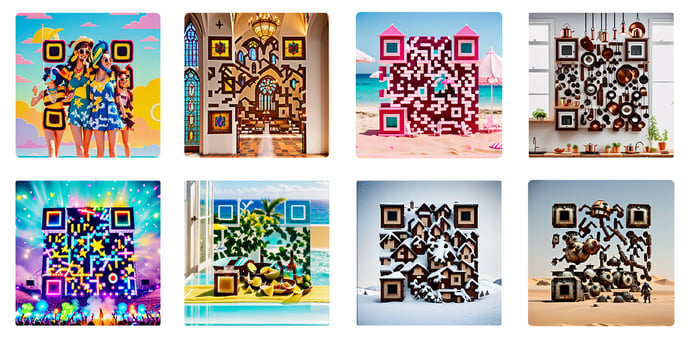
What Works Best
1. Use Compact or Tabletop Scenes: Think like a diorama, miniature world, or tightly framed environment. Top-down or cinematic angles help.
2. Describe Real Objects That Can Be Arranged: Use stackable or alignable items: cookies, boxes, pews, cables, spoons, cereals, etc. Avoid abstract concepts (e.g. “data” or “innovation”). Use tangible nouns.
3. Encourage Structure Without Naming QR Codes
Use words like:
- “arranged as paths”
- “stacked into rows”
- “placed in clusters”
- “creating square formations”
4. Add Depth with Lighting and Texture
Always mention:
- Lighting: “golden hour,” “soft side lighting,” “warm shadows”
- Texture: “dust in the air,” “reflections,” “plastic surface,” “rusted panels”
5. Finish with Mood & Composition
Close with instructions like:
- “chaotic but full-frame layout”
- “playful, cinematic tone”
- “rich detail and layered perspective”
Prompt example
a [scene type] filled with [object types], [arranged into rows / paths / stacked / scattered], [ambient elements like smoke, light, dust], [mood description], soft side lighting and full-frame composition with rich texture and depth
Common Mistakes
- Don’t write “QR code” in the prompt.
- Don’t leave the scene too empty.
- Don’t describe abstract concepts or floating elements.
- Don’t forget shadows, structure, or layering.
How to create an artistic QR code
With all this in mind, now you can put your prompt to the test! Know how to create an AI-Powered QR code here.
