
How to edit the content of a QR Code

Update or change the type of content of your QR Code

This article corresponds to QRCodeKIT's legacy app. For more information, click here.

Log in to your account and follow these steps:

1) Click Edit QR
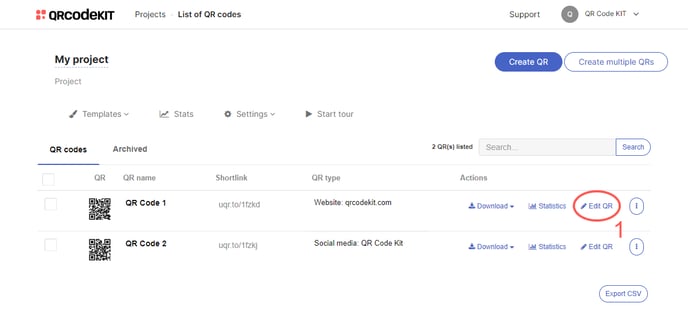
QRCK - Edit QR

2) Update the content and click Save

If you want to use a different type of content, click Change QR type and choose a new one
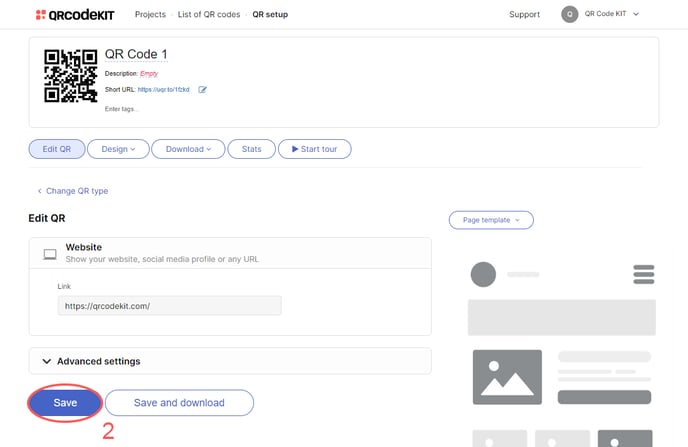
QRCK - Edit content

NOTE: You can update or change the type of content for a QR code as many times as you want without having to reprint it.

✨ New: Free to get started

Your QRs now answer questions

Meet Cleo, the AI that lives inside your QR codes. She answers questions, recommends products, and guides your users, in any industry, any language.

Add Cleo to my QRs
Logos of brands that use Cleo+1,200 businesses already use Cleo
Do you have a vegan option?
Yes! Our falafel bowl and garden salad are 100% vegan. Want to see the full menu?

Your all-in-one QR code solution

Create, manage, and track your dynamic QR codes like a pro.

Get started free