
A Google Reviews QR code makes leaving a review easy. Customers rate their visit, answer 3 quick questions, and AI drafts the review for them to post on Google.
Steps
- In your dashboard, click Create QR code.
- Choose Google Reviews.
- Under Find your business on Google, search for your business and select it.
- Check the page title, such as How was your visit?, and the language. Auto uses the language of the visitor’s phone.
- Review the 3 questions. They’re suggested from your Google listing, and you can edit them.
- Pick the Tone of the generated review: Natural, Enthusiastic or Short and direct.
- Set up the Smart rating filter (see below).
- Under Page style, pick a theme or one of Your templates.
- Click Next: Design. Your QR code is created and saved at this point.
- Choose a style, and add a logo or frame if you like. Changes on this step save automatically.
- Click Download QR Code and pick PNG, PDF, SVG or EPS. To download it later, click Or finish without downloading.
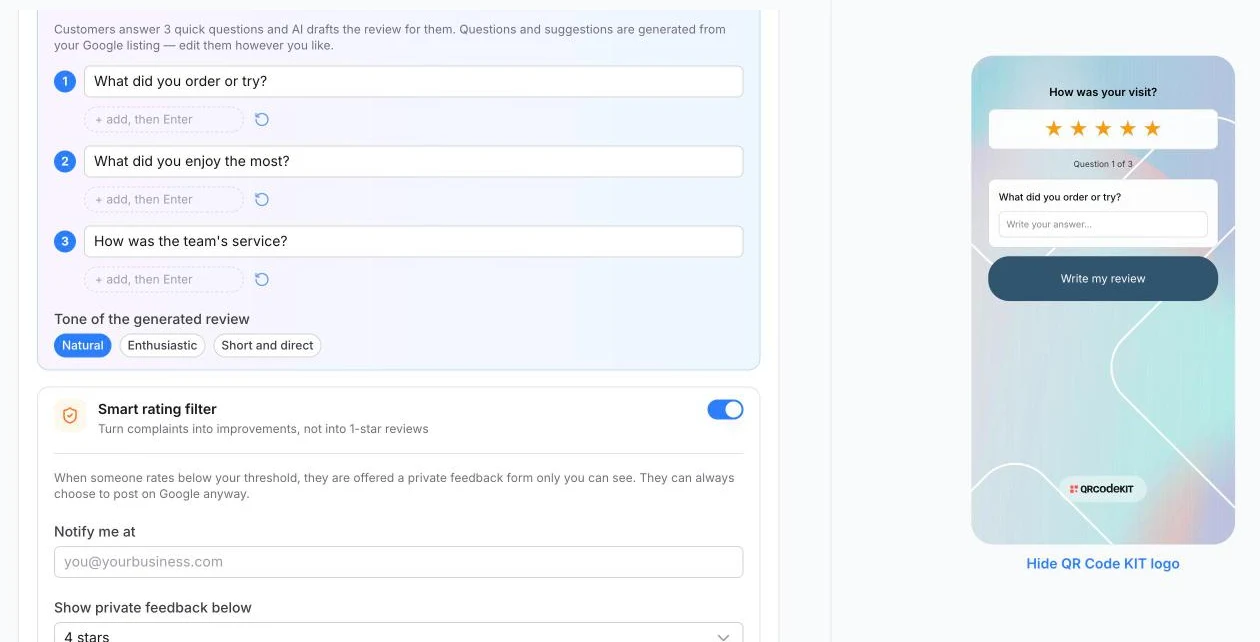
Smart rating filter
With the filter on, customers who rate below your threshold are offered a private feedback form that only you can see. They can always choose to post on Google anyway.
- Show private feedback below: the rating that triggers the form, for example 4 stars.
- Notify me at: the email address that receives the feedback.
All reviews and private feedback appear in Reviews & feedback in the sidebar.
Good to know
- Place the QR code where the experience ends: on the bill, the counter or the receipt.
- You can change the content at any time with the pencil icon in your dashboard. The printed QR code keeps working.
- Not sure this is the right type? See all QR code types.
